
1.1.1.3.2. PARTproject 1.1.1.3.2.4. "Create class system for filters" dialog: Option to remove the Certified/Premium status |  |
| Prev | Next |
In the event that the current status of an electrical component changes to "basic-minus", you have the option of activating the option Remove the PREMIUM/CERTIFIED quality status from projects if the new status is basic-minus in the Create class system for filters dialog.
![Dialog "Create class system for filters [Create class system for filters]"](https://webapi.partcommunity.com/service/help/latest/pages/cn/3dfindit/doc/resources/img/img_3e2a9248083b403987e89c57fe5a8e25.png)
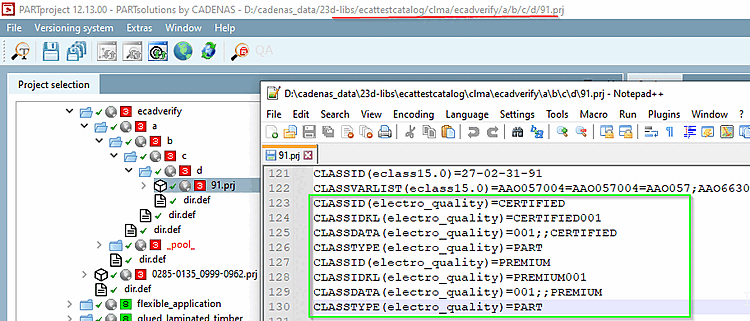
Initial status of an electrical part with quality status CERTIFIED or PREMIUM or both:
Start the plugin under Automation ->Create class system for filters [Create class system for filters] and activate the option Remove the quality status PREMIUM/CERTIFIED from projects if the new status is basic-minus [Remove the PREMIUM/CERTIFIED quality status from projects if the new status is basic-minus].
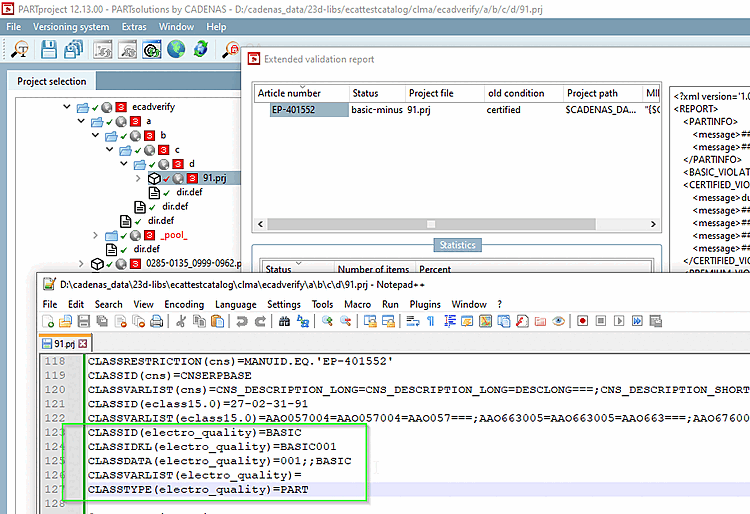
The part has the new status "basic-minus" and "electro_quality" CERTIFIED or PREMIUM is removed.
Extended validation report with "basic-minus" and project file with "electro_quality" downgraded to BASIC
![Dialog "Create class system for filters [Create class system for filters]" with activated option](https://webapi.partcommunity.com/service/help/latest/pages/cn/3dfindit/doc/resources/img/img_e0a2c5fdd11342edac84a949af1e4f05.png)
For details, see Section 5.12.11.28.5, “ Create class system for filters (plugin) ” in eCATALOG 3Dfindit.