

By means of
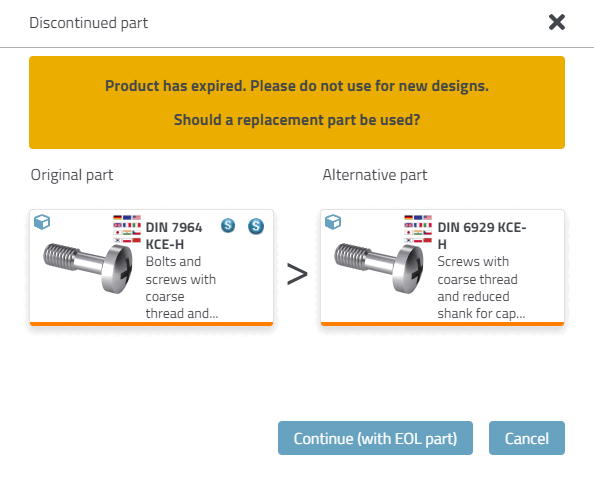
Configuration file replace_std.cfg you can use expired
and replaced projects in the product selector with special icons
, display hint dialogs and export to the CAD system
block:
![[Note]](https://webapi.partcommunity.com/service/help/latest/pages/cn/installation_ecatalogsolutions/doc/images/note.png) | Note |
|---|---|
The method described here can be used administratively within the company. The method under PARTproject -> Tabbed page Settings -> Tabbed page General -> Menu item Expiration date (End of Life) is similar in result, whereby this is used by the catalog manufacturer. See Section 5.9.2.12, “Menu item: Expiry date (End of Life) ” in eCATALOG 3Dfindit. | |



![[Tip]](https://webapi.partcommunity.com/service/help/latest/pages/cn/installation_ecatalogsolutions/doc/images/tip.png) | Tip |
|---|---|
The following part markings complement each other:
| |
The
Using replace_std.cfg is an alternative
to the function under PARTadmin → Index Management [Index administration] -> context menu command
Suppress display [Suppress appearance] (see Section 1.4.3.6.6.11, “
Suppress display / Restore display
” ).
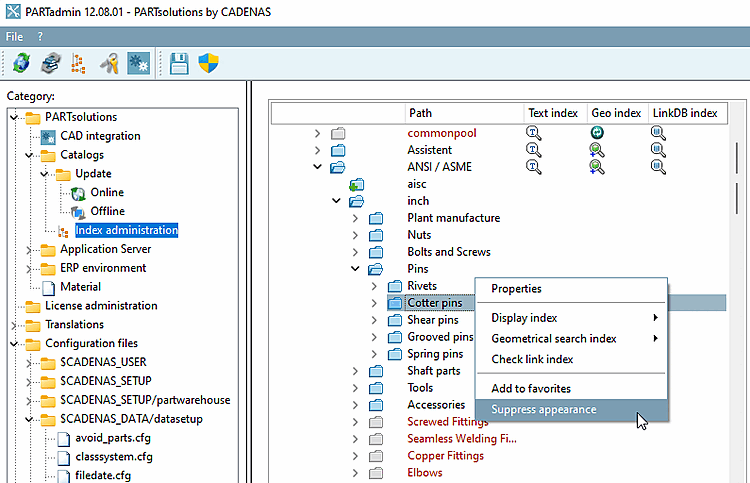
However, the directory structure remains visible when using replace_std.cfg, even if the parts cannot be used. This variant is generally preferable.