
 |
![[Note]](https://webapi.partcommunity.com/service/help/latest/pages/cn/partsolutions_user/doc/images/note.png) | Note |
|---|---|
Filter condition for datasets is role dependent, so has to be defined for each role separately. | |
Function: Show table row but hide LinkDB content. Reason could be data protection, if certain roles (users, departments) should not see certain information from the LinkDB. However, the row itself, they may see.
Setting in configuration file $CADENAS_SETUP/plinkgroups.cfg:
[Role_name]
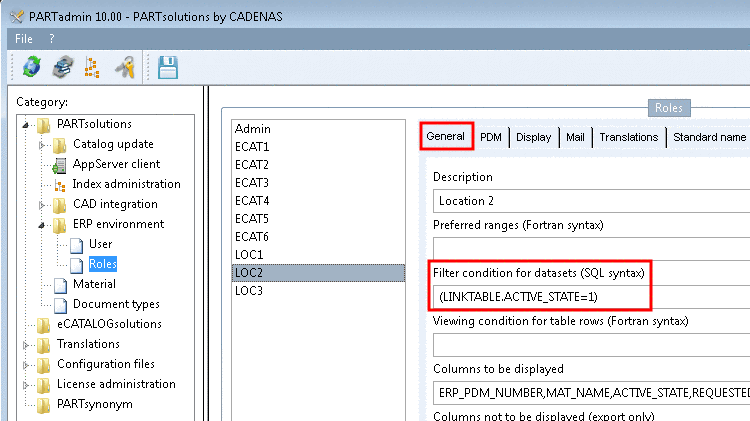
CONDITION=(LINKTABLE.ACTIVE_STATE=1)
Meaning: Datasets which have the entry '1' in the ACTIVE_STATE column meet the condition. These table rows are displayed with all their LinkDB entries. Furthermore all other table rows without any LinkDB entries are displayed as well.
For LinkDB datasets which do not meet the condition the LinkDB content is hidden. However, the dataset itself is displayed.
Setting user interface under PARTadmin -> category Roles -> General tab -> Filter condition for datasets
-> Display in PARTdataManager:
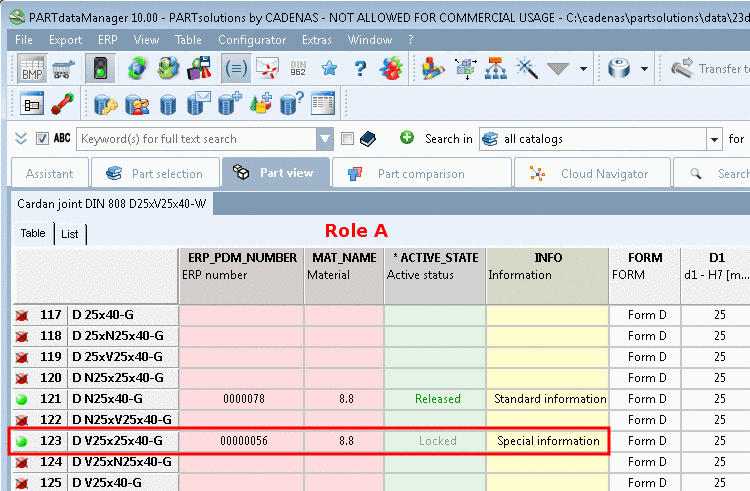
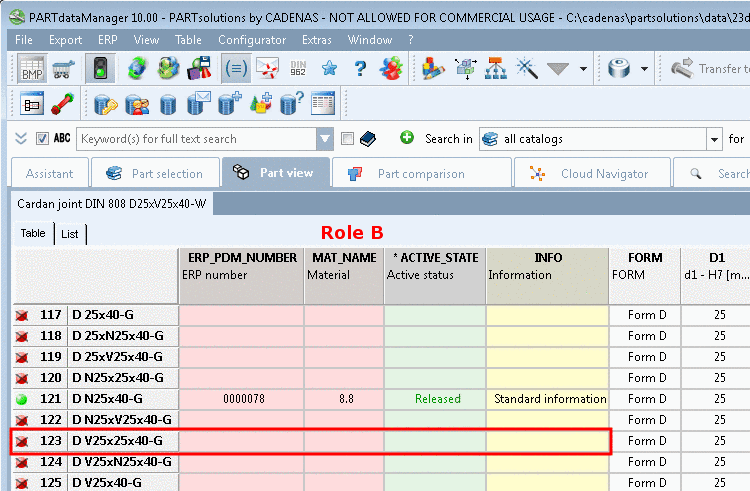
Role B cannot see the LinkDB content of a certain table row, because it does not meet the condition, because the value of ACTIVE_STATE is '0' (locked).