
7.1.
Roles: General " tab page
7.1.2.
Preferred series - plinkgroups.cfg -> Block [Role_name] -> Key "PREFRANGE"
|  |
| Prev | Next |
![[Note]](https://webapi.partcommunity.com/service/help/latest/pages/cn/partsolutions_user/doc/images/note.png) | Note |
|---|---|
Preferred series [Preferred ranges] is roll-dependent and must therefore be defined separately for each roll. | |
Function: Preferred Rows
can be activated and deactivated using the Preferred Rows On/Off [Preferred rows on/off]
 /
/  button. Is the function
is activated, all table rows (characteristics) that correspond to the set
Condition does not match is hidden.
button. Is the function
is activated, all table rows (characteristics) that correspond to the set
Condition does not match is hidden.
Setting via configuration file
$CADENAS_SETUP/plinkgroups.cfg:
[Role_name]
PREFRANGE=(ERP_PDM_NUMBER.NE.'')
Meaning: The ERP number is not empty, i.e. it exists.
Setting via user interface under PARTadmin -> Category Roles -> General tab -> Preferred series [Preferred ranges]
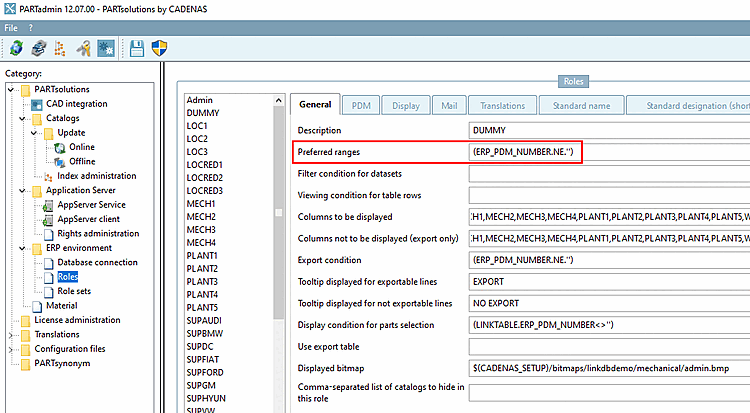
-> Effect in PARTdataManager or 3Dfindit Enterprise
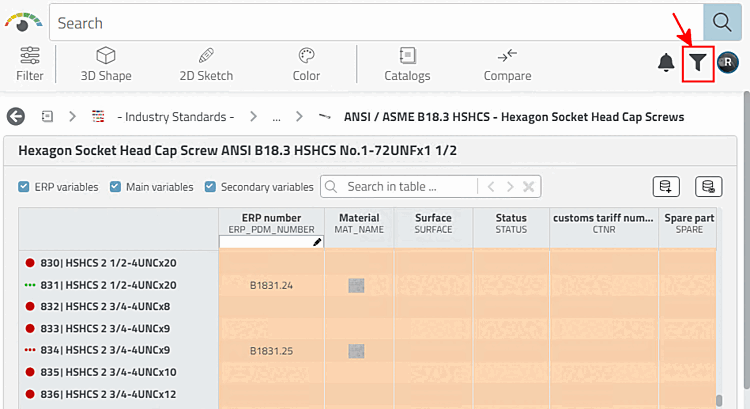
Preferred series off, all rows are displayed: Rows without an ERP number do not correspond to the preferred series condition and are therefore hidden when activated. See next illustration.
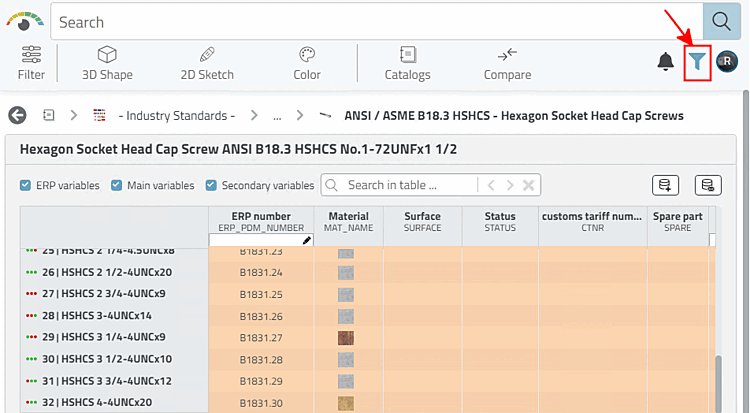
PREFRANGE=(ERP_PDM_NUMBER.NE.'')
PREFRANGE=PRICE.LT.0.4
Only those datasets are displayed whose price is equal or less than 0.4.
PREFRANGE=ACTIVE_STATE.EQ.1
Only data records whose current status [Active status] is 1 are displayed. ('1' stands for " Released ")
PREFRANGE=REQUESTED_STATE.EQ.2
Only data records whose Requested status is 2 are displayed. ('2' stands for " Expired ")
ACTIVE_STATE.EQ.1).AND.(BLNNR.NE.'')
Only data records whose current status [Active status] is 1 (='released') and which also contain an entry in the "BLNNR" column are displayed.
PREFRANGE=((ERP_PDM_NUMBER.NE.'').AND.(PRICE.LT.4.0))
Only those datasets are displayed which have an ERP number AND a price equal or lower than 4.
(CONTAINS(ERP_PDM_NUMBER,'AA').EQ..TRUE.)
Only data records whose ERP number contains the substring 'AA' are displayed.
(CONTAINS(ERP_PDM_NUMBER,'AA').EQ..FALSE.)
Only those datasets are displayed whose ERP number does not contain the substring 'AA'.
![[Tip]](https://webapi.partcommunity.com/service/help/latest/pages/cn/partsolutions_user/doc/images/tip.png)
![Example: Preferred series [Preferred ranges] and display condition for part selection [Display condition for parts selection] are both based on the existence of an ERP number.](https://webapi.partcommunity.com/service/help/latest/pages/cn/partsolutions_user/doc/resources/img/img_ff05f3053d6647578b64f8ab846d10fa.png)
| Note |
|---|---|
The effect is similar to viewing condition for table rows [Viewing condition for table rows], but here, in contrast, it is not restrictive. The function can be switched off by the user. Compare Section 7.1.4, “ Display condition for table rows - plinkgroups.cfg -> Block [Role_name] -> Key "TABRESTRICTION" ” | |