|
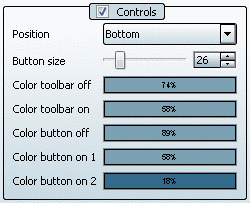
You can also adjust position (top /
bottom), size and color in the toolbar in the 3D
view.
Color toolbar off
Color of toolbar when mouse
is outside of toolbar.
Color toolbar on
Color of toolbar upon
mouseover.
Color button off
Color of button when
mouse is outside of toolbar.
Color button on 1
Color of button when
mouse touches toolbar.
Color button on 2
Color of button upon
mouseover.
![[Note]](https://webapi.partcommunity.com/service/help/latest/pages/cn/partsolutions_user/doc/images/note.png) | Note |
|---|
The % value in
the color field is the alpha canal in the
settings dialog. It controls the
transparency. |
|
|