

Settings...: The dialog window of the same name opens.
![[Note]](https://webapi.partcommunity.com/service/help/latest/pages/cn/partsolutions_user/doc/images/note.png)
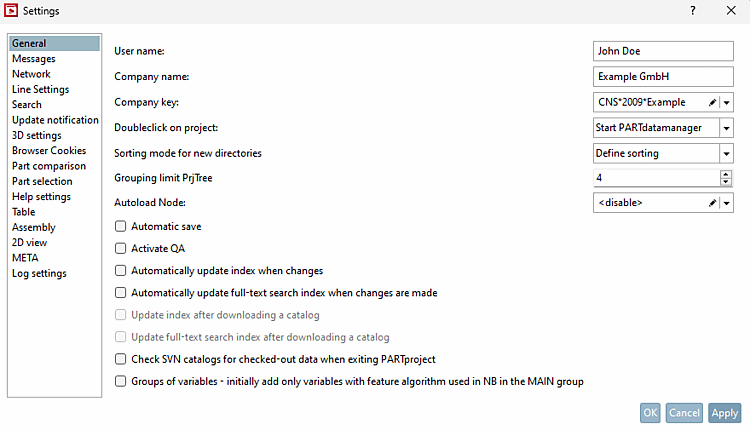
Note As company key [Company key] [16] the respective license abbreviation must be entered.
The key is used if no key is stored on the QA server and in the main directory of the catalog.
Double-click on project [Doubleclick on project]: Specify which program should be used to open the file when double-clicking.
Grouping limit PrjTree: Specify a value above which files with the same extension are grouped together in a folder.
Load node automatically [Autoload Node]: Optionally set whether the last opened project or a specific path should be loaded when PARTproject is started.
Example of path specification:
D:/23d-libs/catalog/part
Save automatically [Automatic save]: Changes to projects/directories are saved without prompting.
Activate QA: Hereby you activate the SVN administration of the catalogs. Read about this under Chapter 6, PARTproject QA.
Automatically update index when changes are made [Automatically update index when changes]: Performs an automatic update as soon as you make changes to the index.
Automatically update full-text search index when changes are made: Automatically updates the full-text search index as soon as changes are saved.
Update index after downloading a catalog [Update index after downloading catalog]: The option saves the manual updating of the index via PARTadmin → Index management [Index administration].
Update full-text search index after downloading a catalog: Updates the full-text search index after downloading a catalog.
Check SVN catalogs for checked out data when closing PARTproject [Check SVN catalogs for checked-out data when exiting PARTproject]: If files are still checked out when exiting the program, you will receive a message.
Sequence/groups of variables - Only keep variables with characteristic algorithms that form NB in the MAIN [Order/groups of variables - initially add only variables with feature algorithm used in NB in the MAIN group]: When the Variable groups [Groups of variables] dialog is opened for the first time, variables are automatically extracted from the NB and assigned to groups if no groups have been set yet.