2.8.1.2.2. PARTproject: Columns to sort natural
Row sorting for digits/numbers

By default, the whole string is taken as text and so the leading number has higher priority than the total numerical value. See following figure from PARTdataManager.
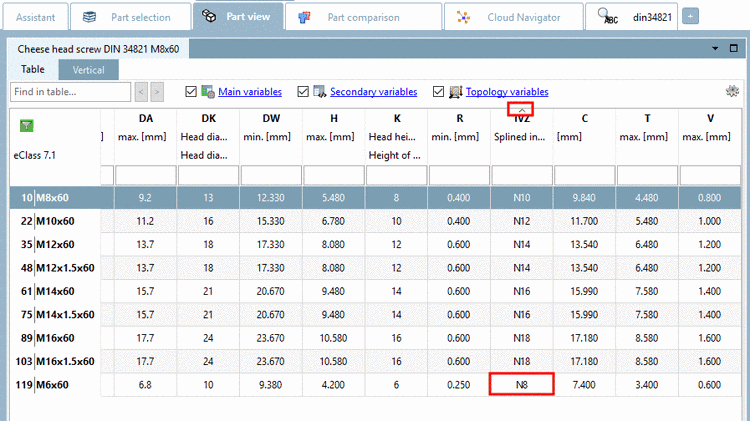
Default row sorting

Default row sorting

The behavior can be changed in PARTdataManager under Extras menu -> Settings... -> Table -> Sort digits as numbers.

  • Sort digits as numbers activated:

    For the sorting the value of the total number is considered, so that a natural sort happens.

  • Sort digits as numbers deactivated:

    The whole string is taken as text and so the leading number has higher priority than the total numerical value.

    [Note]Note

    This can also only be set explicitely for certain variables in the project file. Up to now this had to be performed on file level. Now as of V11 SP5 you can comfortably manage it within PARTproject.

    1. In PARTproject, on the left under Project selection, select the desired project.

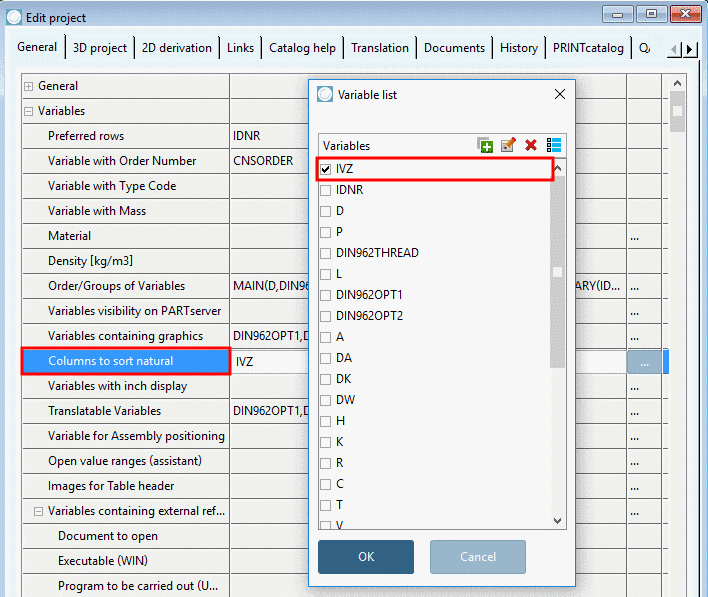
    2. On the right, under Edit project -> tabbed page General -> Variables -> Columns to sort natural, click on the ... button.

      -> The dialog box Variable list is opened.

    3. Choose one or several variables and confirm with OK.

      If now in PARTdataManager, the optionSort digits as numbers is deactivated, nevertheless, those variables are sorted as numbers, which have been stated in the respective project. If the option is activated, then all.