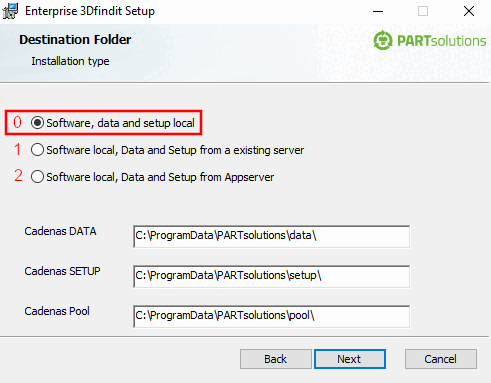
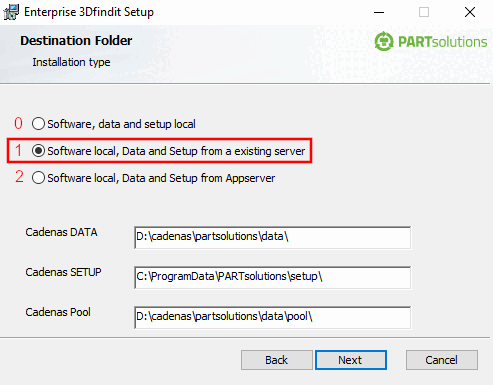
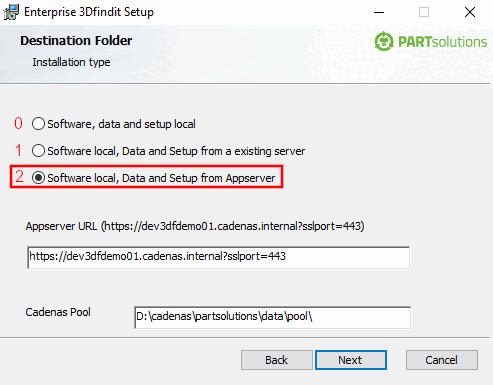
The installation mode has to be set mandatorily for partsolutions_enterprise.msi and partsolutions_professional.msi.
INSTALL_MODE=0/1/2
0: Software, data and setup local [Software, data and setup locally] (all local)
CADENAS_DATA and CADENAS_SETUP can be set optionally. The statements are relatively to PRODUCT_DATA by default.
1: Local software, data and setup from an existing server [Software Local, data and setup from an existing server]
(Software locally, points to an existing installation, maybe a Client setup)
For Client installation with file server, PARTapplicationServer optional
CADENAS_DATA=\\myserve\CADENAS_DATA_SHARE
CADENAS_SETUP \\myserver\CADENAS_SETUP_SHARE
2: Local software, data and setup from the app server [Software Local, data and setup from the app server]
Software locally, but all other (Setup/Data) comes from AppServer
APPSERVERURL=https://myappserver
CADENAS_DATA, CADENAS_SETUP can be set optionally. The statements are relatively to PRODUCT_DATA by default.
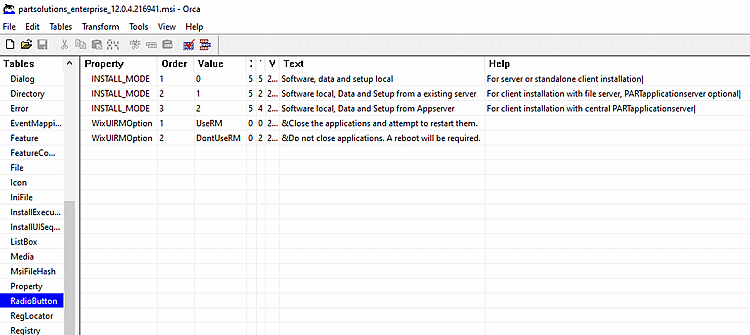
The following Orca table shows the installation modes, which can be set under INSTALL_MODE.
The following figures show the equivalents in the UI.