
 |
With SP4 some new features have been added to the Extended search filter assistant:
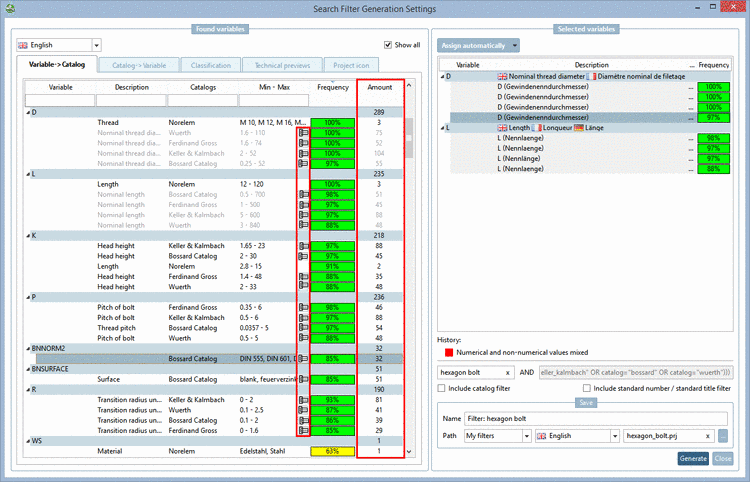
Beside Frequency which shows the percentual frequency of a variable over all projects you can now see the absolute Amount of projects in addition.
Have a look on the variable D in above figure.
The variable D exists in 289 projects. Below this you can see the distribution per catalog in absolute numbers.
In Würth catalog the variable D occurs in all projects (100%), in absolute numbers 75 projects.
In Bossard catalog the variable D exists in 97% of projects, in absolute numbers 55 projects.
Furthermore you can check the technical previews (of the respective catalog) during the selection process.
Therefor click on the icon
 . -> The dialog box Previews opens.
You can call the dialog box Search Filter Generation Settings anytime later and further edit the settings.
The assistants are found under Catalogs -> - Filter assistants -.
At the desired assistant, click on the context menu command Edit.
When searching with an assistant the settings area of the standard search is grayed out.


Also see Section 3.11.1.1, “ Extended search filter assistant ”.