1.5.3.2.  Task details

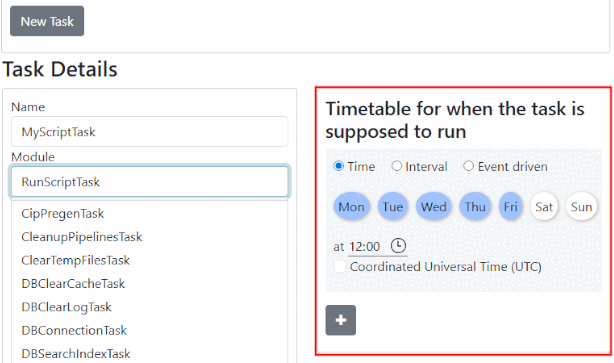
Enter the relevant details under Task details:

  • Name: Assign a name

  • Module: Make the desired selection in the list field:

    [Note]Note

    The corresponding task-specific options are displayed in the Settings [Configuration] section.

    With RunScriptTask, for example, the following:

    • script: In the list box, the ...\setup\scripts\pappserver existing scripts.

    • arguments

    • triggerFinishedEvent

    • customFinishedEvent

    • customFailedEvent

    • CleanupPipelinesTask

    • ClearTempFilesTask

    • CreateAnalysis Task

    • DBClearCacheTask

    • DBClearLogTask

    • DBConnectionTask

    • DBSearchIndexTask

    • PW2PSolExport

    • ReportsTask

    • RunPipelineTask

    • RunScriptTask

    • SendMailTask

    • UpgradeIndexTask

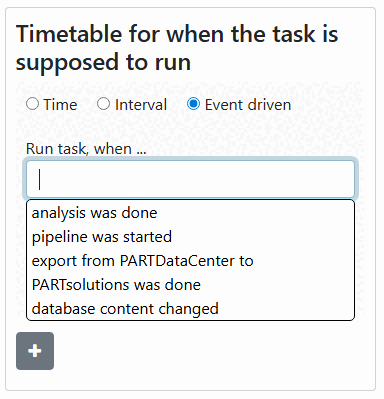
  • Schedule when the task is to be carried out:

    Choose desired mode:

    • Time: Determine the day and time

    • Interval: Repeat every <soundsovielte> second | minute | hour

    • Event driven: Execute task when ...

      Either select a predefined task from the list field or enter an event name that you have previously defined under CustomFinishedEvent or CustomFailedEvent (see Section 1.5.3.4, “ Example "TriggerFinishedEvent"”).

      List field options:

      • analysis was done

      • pipeline was started

      • export from PARTdataCenter to PARTsolutions was done

      • database content changed