|
This search detects fitting unmachined parts for the production of a finished parts. For example: An engineer is looking for a special flange. Then he wants to search for already existing unmachined parts, from which the flange can be produced, in order to avoid the redundant creation of a new unmachined part. This process is very time consuming, because the parts have to be overlaid in the CAD one after another.
With PARTsolutions "Search for unmachined parts" you can do this much faster.
The search detects, whether a part is completely contained in another part: The finished part has to be smaller than the unmachined part, so that it can be produced by removing wasted material. As soon as the extensions of the finished part exceed the ones of the unmachined part only at a certain point, it cannot be used at all or at least badly.
The search calculates the volume of the material to remove (waste). The less material to remove, the higher the ranking in the result list, because this criterion is determining for the manufacturing costs.
The reverse search is also possible: Which finished parts can be produced from a certain unmachined part?
The search can be performed for parts or complete directories. All finished parts then are compared with all unmachined parts and displayed in a report.
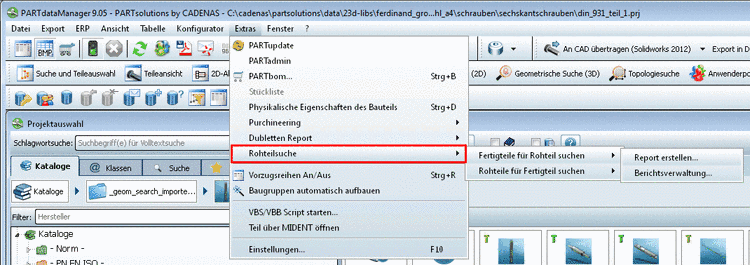
Extras menu -> Search for unmachined parts -> Search finished parts for unmachined part / Search unmachined parts for finished part -> Create report...
or alternatively via context menu of a project or directory in the index tree.
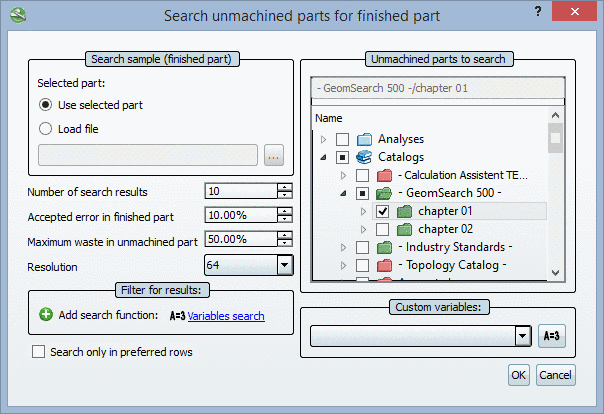
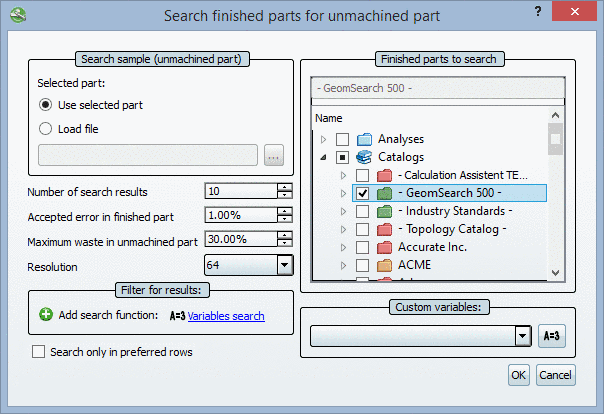
The setting options for Search unmachined parts for finished part and Search finished parts for unmachined part are identic.
Accepted error in finished part
The error is caused by "missing material" on the unmachined part.
Maximum waste in unmachined part
The maximum waste defines, how much material is allowed to be remove.
The resolution controls the search quality. With higher resolution more details are covered, however the search takes more time.
A Search for unmachined parts can be combined with a Variables search. Under Section 4.7.2.7.1, “ Unmachined / Finished part report: Example with "Filter for results" and "Custom variables" ” you can find an example on this.
Detailed information on Variables search is found under Section 3.1.6.4.5, “ Variables search ” in PARTsolutions - User manual.
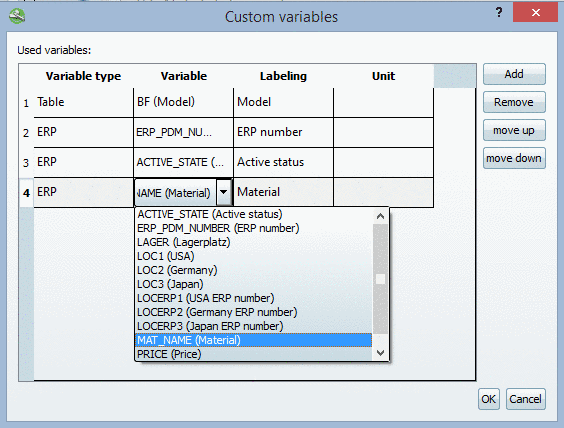
With click on the button Edit custom variables
 the Custom variables dialog box opens.
Here you can define variables, which will be shown at each part in the report in addition.
You can define both ERP variables and variables from the characteristic attribute table.
At first click on in order to add a new line.
At first determine the variable type. With double-click on a line under Variable type the list field opens with the following options:
With double-click on a line under "Variable" a list field with the following input options opens:
Options for variable type "ERP":
The ERP variables from the table are read and displayed in the list field. Select one of the displayed variables or enter yourself a value.
Options for variable type "Table":
The variables of the characteristic attribute table are read and displayed in the list field. Select one of the displayed variables or enter yourself a value.
Enter a label in the input field. It will be displayed in the report later.
Optionally you can select a unit in the list field.
If the variable has no own unit, the selected unit is displayed.
If the variable has a unit, the value is converted - if needed. (The conversion is only possible for the type "Table".)
The diameter in the table is displayed in "inch". You have selected "mm" in the list field. -> The value is automatically converted from "inch" to "mm".
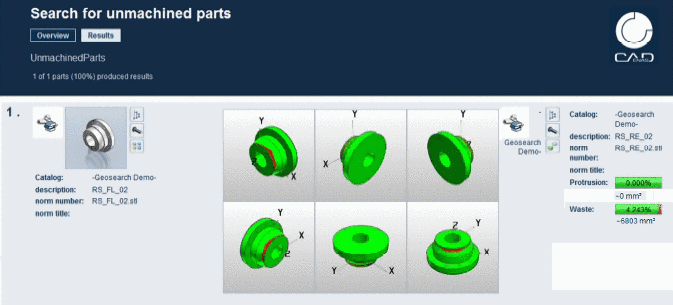
The result list of reports of the type Search finished parts for unmachined part shows finished parts, which completely fit into the unmachined parts. According to the set tolerance, volume which does not fit into the unmachined part, is marked in red.
The result list of reports of the type "Search unmachined parts for finished part" shows unmachined parts, from which the finished product can be produced. According to the set tolerance wasted volume of the unmachined part is marked in red.
In the exemplary figure the Waste is 4,2%. Protrusion means, that the end product does not completely fit into the unmachined product. As of version 9.05 the volume is displayed in addition to the percent value.
Parts from the result list do not have to be absolutely opened, because 6 preview images depict the respective part from all sides and volume errors are marked in red.
This is very useful information, because the part is not yet assembled and another unmachined part from the stock can possibly be used. The report delivers all needed information.
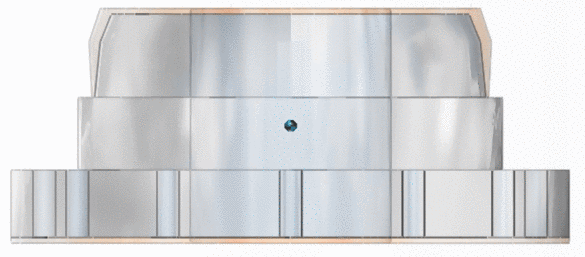
It is anytime possible to call up the 3d comparison from the report and to overlay unmachined and finished part.
The 3d comparison shows in detail, exactly where on the unmachined part wasted material has to be removed (orange), in order to produce the finished part (blue).
Search for unmachined parts is part of the geometric search and thus available in the following packages:
![[Note]](https://webapi.partcommunity.com/service/help/latest/pages/cn/partwarehouse/doc/images/note.png)