

![[Note]](https://webapi.partcommunity.com/service/help/latest/pages/cn/partwarehouse/doc/images/note.png)
When changing the default configuration all changes are written in a second Setup directory. In this way it is directly evident, whether changes have been made at all and if so in which scope and which exactly. The Default_User directory is also inside this Setup and will be managed as well.
To activate the function, specify an environment variable CADENAS_SITESETUP (e.g. in the file start.env). The directory must already be created. For example:
CADENAS_SITESETUP=$CADENAS/sitesetup
If the function is active and any 3Dfindit application attempts to write to SETUP, a copy of the corresponding configuration file is automatically created under SITESETUP and the changes are saved there. If the default state is restored, the corresponding file is automatically deleted again under SITESETUP.
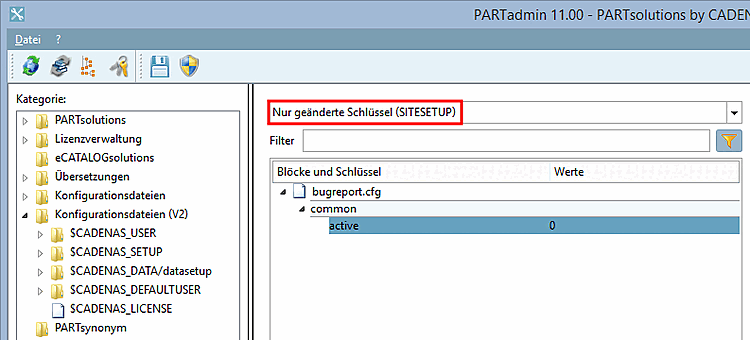
In the user interface under the Configuration files category, you can set the Only changed keys (SITESETUP) filter. Only changed keys are then displayed.
The Comment for current installation and Last changes dialog areas are also available when SITESETUP is activated.
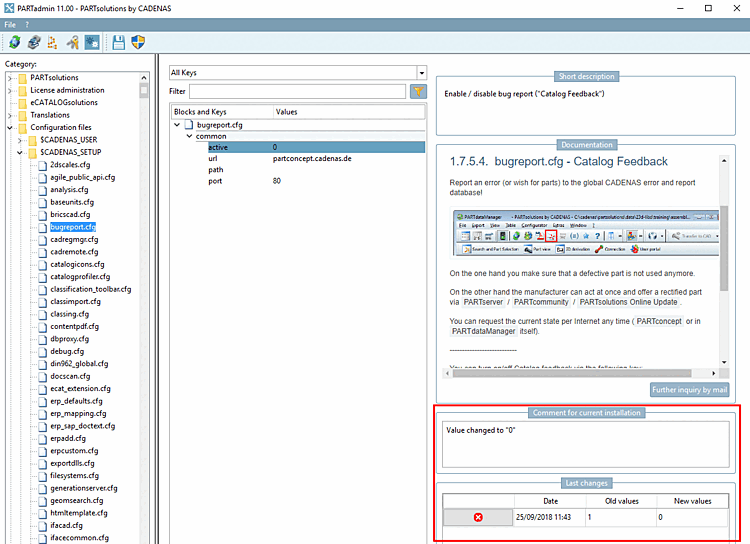
Comment for current installation
In the Comment [Comment for current installation] dialog area for the current installation [Comment for current installation], comments can be entered for changes (e.g. reason for the change)
Entries are saved in the SITESETUP directory under
$CADENAS_SITESETUP/configEditorUserIo.xmlare saved.[43]In the Last changes dialog area, the last value changes of the currently selected key are listed with the date.
Click on
 an entry can be removed. Double-click on a value in the Old values or New values column to set this value again.
Entries are saved in the SITESETUP directory under
$CADENAS_SITESETUP/configEditorUserIo.xmlare saved.[44]
Via "Conditions" you can easily specify conditional sections in the start.env of your installation and thus use different setup directories. See Section 2.9.1.1, “start.env
with conditional sections
” in Installation.
You can find the environment variable under system variables of your installation as well.
Under ? Menu -> Systeminfo/Support [System info/Support] (or F7 key) -> 3Dfindit variables you can also find the variable §CADENAS_SITESETUP. The variable is linked to the corresponding directory. (However, you must have the appropriate rights for the directory).