
 |
V11 offers the possibility to show HTML pages in a separate docking window. In this way the user get information very directly and does not have to use other tools. The web view reacts to events in the Part selection or Part view. This option can also be used in order to set links to a PDM system, for example.
As of V11 SP6 the
variables $CATALOG_NAME.
and $CATALOG_DESC. can be
used in the Part selection.
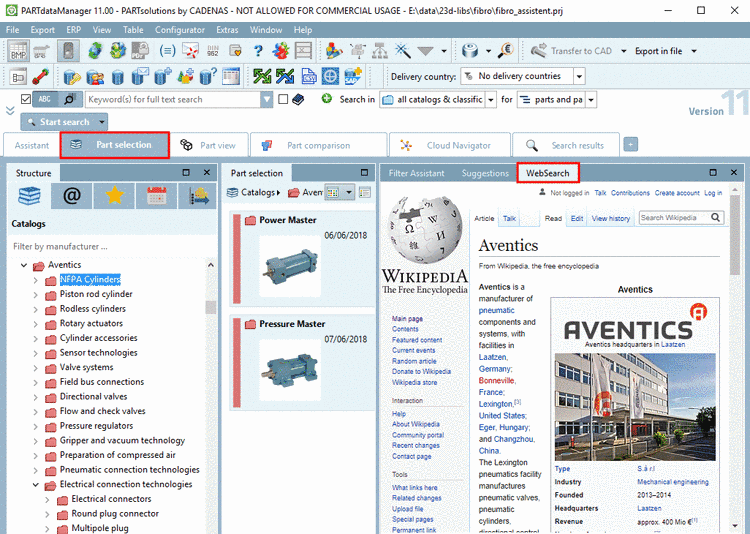
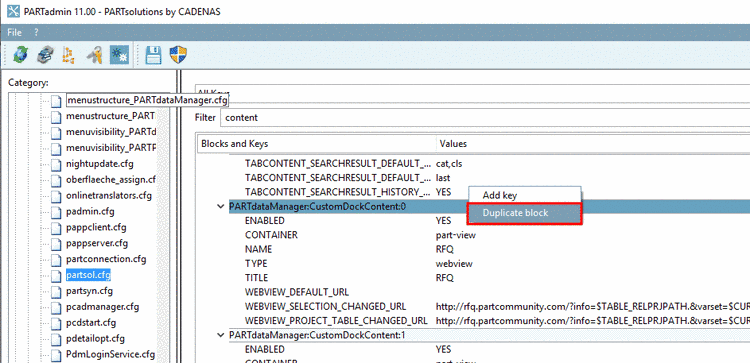
A separate docking can be created very easy in PARTadmin via configuration file. In complex scenarios even scripts can be used.
In the context menu, click on Duplicate block.
Read the comments in the single keys to adjust everything as desired.
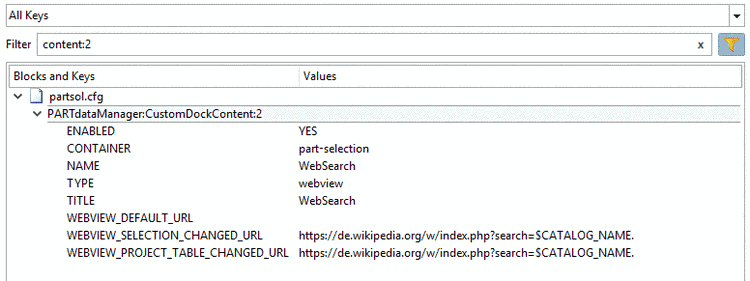
CONTAINER: In order to display in the Part view, enter "
part-view", in order to display in Part selection enter "part-selection".WEBVIEW_SELECTION_CHANGED_URL: URL to open when current selection is changed.
WEBVIEW_PROJECT_TABLE_CHANGED_URL: URL to open when project table is changed.
It absolutely makes sense to set both keys on the same value.
https://de.wikipedia.org/w/index.php?search=$CATALOG_NAME.
Here, the variable
$CATALOG_NAME.has been used. Just as well e.g.$NORM_NUMBER.(NB) or$NORM_TITLE.(NT) can be used.
On this, also compare the option Product information pages. The catalog manufacturer can set a link to his web shop, for example. Detailed information on the creation in PARTproject can be found under Section 5.9.2.1, “Menu item General ” in eCATALOGsolutions Manual -> Product information pages.