

A newly created or changed table can only be saved and left, if Identification data have been given.
![[Note]](https://webapi.partcommunity.com/service/help/latest/pages/cn/partwarehouse/doc/images/note.png) | Note |
|---|---|
| |
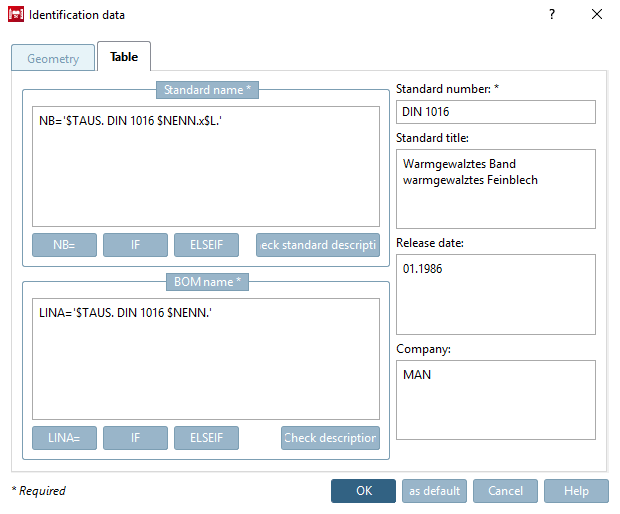
Details on single fields of the dialog box Identification data
The standard designation (NB) [Standard name (NB)], for example, is made up of the standard number [Standard number], standard title [Standard title] and variable values, which are read dynamically from the table.
![[Important]](https://webapi.partcommunity.com/service/help/latest/pages/cn/partwarehouse/doc/images/important.png)
Important Please absolutely regard the guidelines under Section 7.18.9.3, “ Guideline for NB, SHORTNB, LINA definition and type identification ”.
NB='ISO xy Bolt $D.x$L.'
Note The standard designation (NB) [Standard name (NB)] must be unique!
The standard designation (NB) [Standard name (NB)] is transferred to the CAD system during export.
With some CAD systems, the number of characters is limited. So also remember to set the short name [Short name] in PARTproject under Settings -> Tabbed page General. See Section 5.9.2.1.7, “ Short description (max. 16 characters) ”.
Make sure you enter your details within the two quotation marks provided. If you want to include table values in the designation, please append them in the format
Dollarzeichen
Variablenname
Punkt
Don't use empty spaces between the single parameters.
NB='Hexagon cap nut DIN 1587 - $NENN.'
The (translated) wording of the standard designation [Standard name] (NB) appears when the corresponding part is called up in the PARTdataManager in the title bar of the 3D view.
When you open the Identification details [Identification data] window, the expression NB= '' is already available, but can also be inserted using the button.
Insert IF function in condition. For how it works, see Section 7.8.12, “ Attribute algorithms ”.
Insert ELSEIF function in condition. For how it works, see Section 7.8.12, “ Attribute algorithms ”.
You can check the entered expression for (syntactical) correctness via standard description.
The parts list designation (LINA) [BOM name (LINA)] is also transferred to the CAD system during export and appears there in the parts list.
Important Please absolutely regard the guidelines under Section 7.18.9.3, “ Guideline for NB, SHORTNB, LINA definition and type identification ”.
Standard [Standard number] number and standard title [Standard title]:
Your company / company name where model / table has been created.
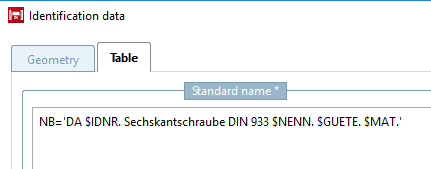
![Standard designation [Standard name] / component designation](https://webapi.partcommunity.com/service/help/latest/pages/cn/partwarehouse/doc/resources/img/img_99e7c21280204ab7978b6cd0e8ec2084.png)
![Component name composed of standard number [Standard number] and standard title [Standard title]](https://webapi.partcommunity.com/service/help/latest/pages/cn/partwarehouse/doc/resources/img/img_059d36023c584c4195e2dac3bdbe9c62.png)