
1.7.4.15.
partsol.cfg 1.7.4.15.5.
Block
[PARTdataManager:CustomDockContent:0] - Create custom docks with a web-view
via config |  |
| Prev | Next |
Create your own dockings with web content using a configuration file. The web view reacts to events in the part selection or selection in the table.
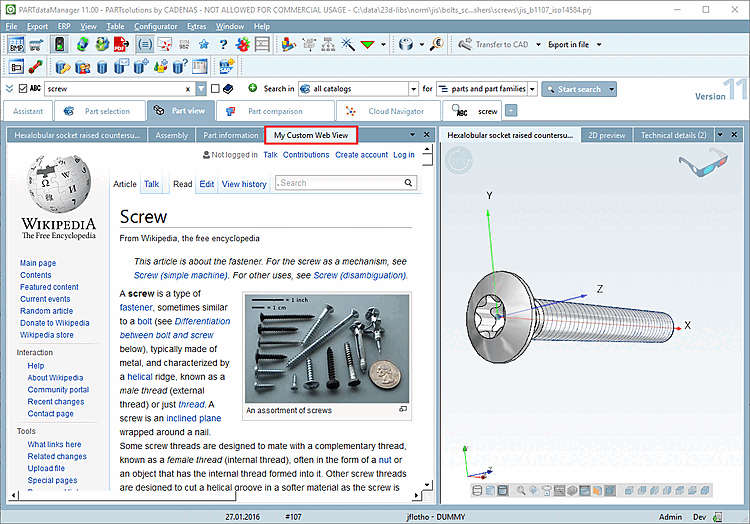
The linking to Wikipedia serves as an example. You can just as well link to your shop or provide installation instructions, etc.
Using the following example results in the above depiction, when searching for "screw" and clicking one of the first results.
WEBVIEW_SELECTION_CHANGED_URL=https://de.wikipedia.org/w/index.php?search=$NN.
Any CADENAS environment variables can be used ($CADENAS_LANGUAGE.) or also $NORM_TITLE.=Norm title or $NORM_NUMBER.=Norm number or
More details can be found in the descriptions of the keys itself.
It is also possible to access the widget from script:
dim app
set app = CreateObject("partdatamanager.application")

dim view
set view = app.FindSectionContent("UniqueNameHere")
if IsObject(view) then
  view.loadUrl("https://www.google.de")
end if
![[Note]](https://webapi.partcommunity.com/service/help/latest/pages/cn/partwarehouse/doc/images/note.png)