

You can select the language under Language. This allows you to change the language setting selected during the installation of ENTERPRISE 3Dfindit (Professional) / eCATALOG 3Dfindit.
![[Note]](https://webapi.partcommunity.com/service/help/latest/pages/cn/partwarehouse/doc/images/note.png)
!["Language [Language] " dialog area with selection options for program interface [Graphical user interface] and catalog [Catalog]](https://webapi.partcommunity.com/service/help/latest/pages/cn/partwarehouse/doc/resources/img/img_ca1306ae3ce14f33bf9bb591d8f7b71b.png)
"Language [Language] " dialog area with selection options for program interface [Graphical user interface] and catalog [Catalog]
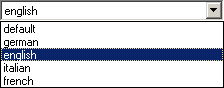
The language which is at the top of the list is the catalog language.
When setting the language for the program interface, the same language is automatically set as the catalog language. (This language jumps to the first position)
If you want a different language as the catalog language, move this language to the first palace in the list via drag and drop. The order also acts as a fall back list, if the set desired language is unavailable.
The change will take effect after restarting the corresponding module.