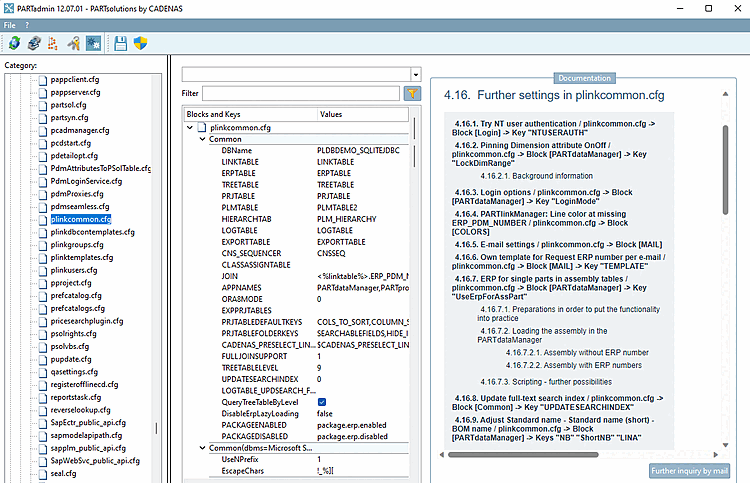
- 5.18.1. Keep original row / plinkcommon.cfg -> Block [PARTdataManager] -> Key "KeepOrgRow"
- 5.18.2. Pin dimension feature on/off / plinkcommon.cfg -> Block [PARTdataManager] -> Key "LockDimRange"
- 5.18.3. Function characteristic pin on/off / plinkcommon.cfg -> Block [PARTdataManager] -> Key "LockFunctionRange"
- 5.18.4. Login options / plinkcommon.cfg -> Block [PARTdataManager] -> Key "LoginMode"
- 5.18.5. PARTlinkManager: Line color at missing ERP_PDM_NUMBER / plinkcommon.cfg -> Block [COLORS]
- 5.18.6. E-mail settings / plinkcommon.cfg -> Block [MAIL]
- 5.18.7. Custom template for requesting an ERP number by e-mail / plinkcommon.cfg -> Block [MAIL] -> Key "TEMPLATE"
- 5.18.8. Update full-text search index after LinkDB changes / plinkcommon.cfg -> Block [Common] -> Key "UPDATESEARCHINDEX"
- 5.18.9. Standard designation - Standard designation (short) - Adapt parts list designation / plinkcommon.cfg -> Block [PARTdataManager] -> Key "NB" "ShortNB" "LINA"
- 5.18.10. ADDITIONALTABLES
The configuration file plinkcommon.cfg contains user-independent settings for the ERP integration (e.g. general settings for the table layout of PARTdataManager/3Dfindit and
PARTlinkManager, the creation of required database columns).
Many settings can be made in the user interface. The call is made via PARTlinkManager ➝ ➝ Configure ERP environment.
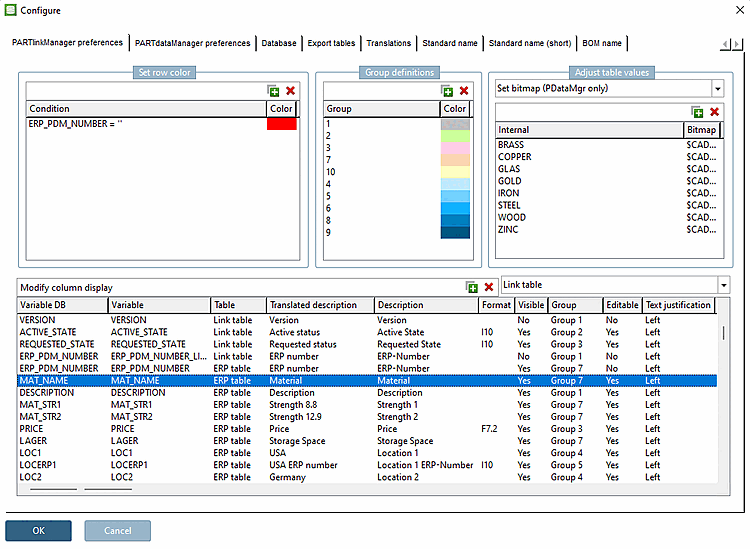
Some settings must be made specifically in the configuration file plinkcommon.cfg (see figure below).