
 |
Search functionality should also enable searching for Order number and Type code. For parts without value range fields it's easy to index the needed values for each project line. In contrast, at parts with value range fields the Order number/Type code changes with each change of a value range field (except functional characteristics, for example).
At catalogs with
complex value ranges, where resolving would effect millions and billions of
combinations, which exceed the limit set by config, the search does not use
the index. Instead the search term entered in PARTdataManager when searching
for order number / type code  is decoded via regular
expressions (generalized search pattern for character strings)
"in reverse direction" and so the respective project found and then the
concrete values of the value range fields detected.
is decoded via regular
expressions (generalized search pattern for character strings)
"in reverse direction" and so the respective project found and then the
concrete values of the value range fields detected.
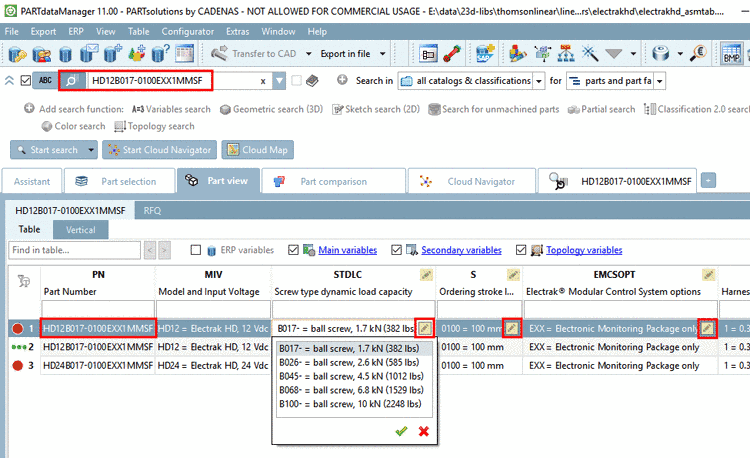
Example project with a lot of value range variables which build up the part number / type code interactively
The purpose of
the Reverse TypeCode Rule
Editor is to create the configuration file pnoreverse.cfg with said regular
expressions. The Editor has a lot of functions to ease the creation
process.
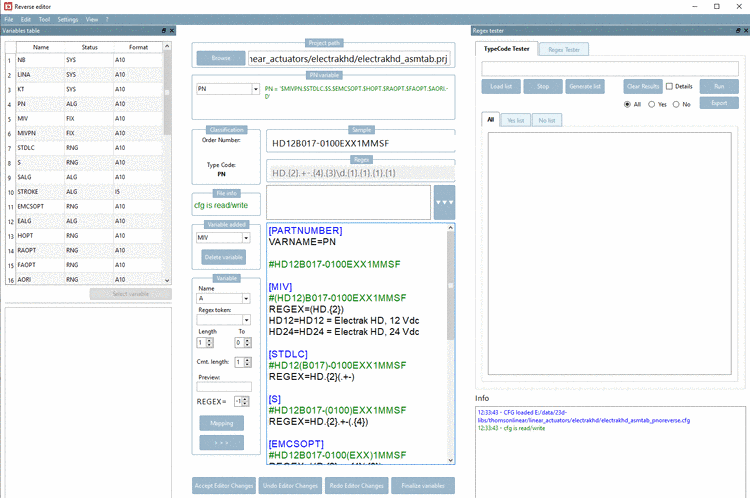
Details on this can be found under Section 5.8.2.1.15.32, “ Reverse TypeCode Rule Editor ” in eCATALOGsolutions Manual.