
7.13.6. Docking window "Setup " - Setup configuration
7.13.6.1. Build up
configuration - Example |  |
| Prev | Next |
Select a configuration in PARTproject a configuration and click on the context menu command Open with PARTdesigner [Open with PARTdesigner].
![[Note]](https://webapi.partcommunity.com/service/help/latest/pages/cn/partwarehouse/doc/images/note.png) | Note |
|---|---|
In this example, for the creation of project a naming convention had been used (additional token "_asmcfg" in name). | |
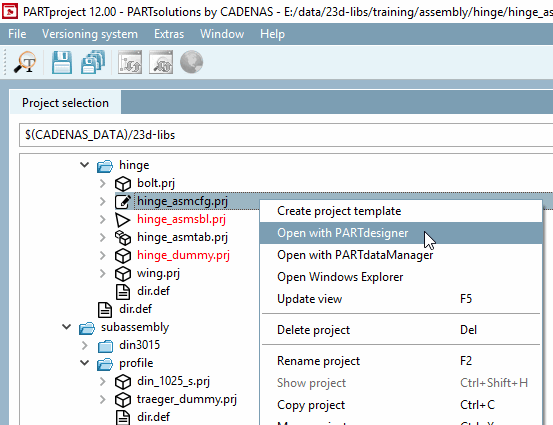
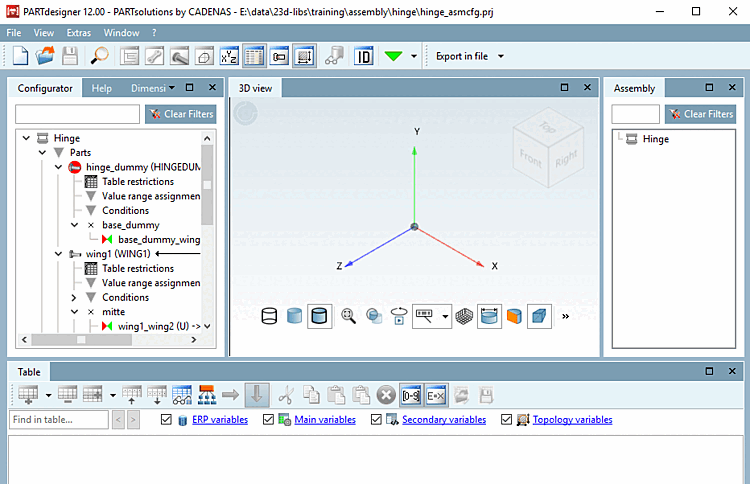
-> The configuration is opened in PARTdesigner is opened.
-> The configuration elements are already created in the Configurator docking window, but must first be selected.
-> The Table and 3D view docking windows are still empty. Initially, only the name of the assembly can be seen in the Structure [Assembly] docking window.
Click alternately on the displayed elements under Structure [Assembly] and on a table row (if there are several rows) to select the desired characteristic until the complete configuration is set up.
A complete example on this can be found under Section 7.13.3.3, “Testing the Assembly Configuration ”.