
 |
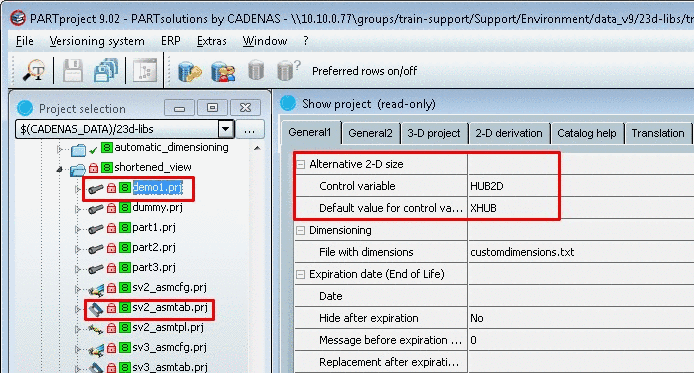
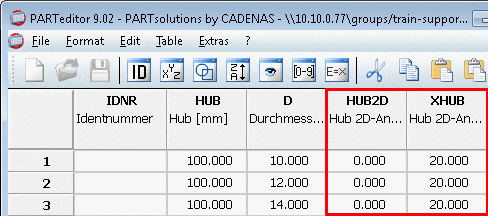
In order to make an alternative size available in the 2-D derivation, the following prerequisites are necessary in the modeling process of the manufacturer:
Entry under PARTproject -> Edit project -> tab page General1 -> section Alternative 2D size:
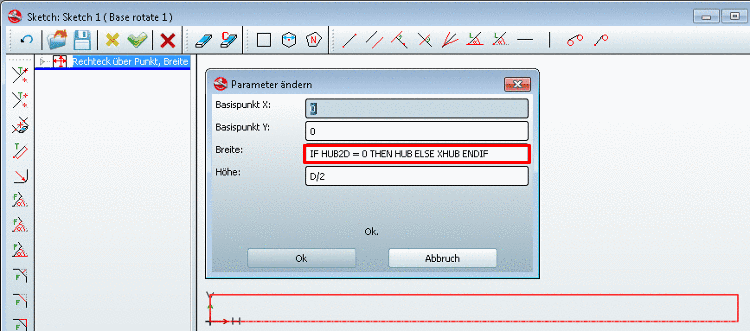
In the sketch apply the respective values dynamically with an IF condition.
IF HUB2D = 0 THEN HUB ELSE XHUB ENDIF
Optionally you can assign an automatic dimensioning in the project directory in the
customdimension.txtfile.HORIZONTAL { PNT1 { CONPNT { "Bauteilname@Anfügepunktname" } } PNT2 { CONPNT { "Bauteilname@Anfügepunktname" } } POSITION { BBOXOFFSET{ 15 } } FONTHEIGHT { 3.5 } TEXT { "{HUB}" } }
![[Note]](https://webapi.partcommunity.com/service/help/latest/pages/cn/partwarehouse/doc/images/note.png) | Note |
|---|---|
Detailed information can be found under Section 5.10.1, “ 2D derivation: Alternative 2D size (shortened) ” in eCATALOGsolutions Manual. | |