
1.11.1.2. eCATALOGsolutions 1.11.1.2.1. Method for
determination of search variables changed
|  |
| Prev | Next |
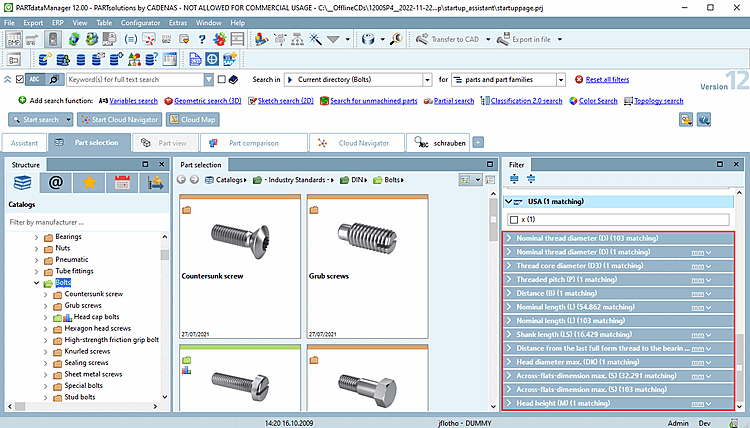
In V12, search variables [Search Variables] are displayed in the facet filter, among other things. They are an excellent way to quickly find the parts you are looking for.

In order for the search variables in the facets to be sorted according to their importance, the setting options are of particular importance.
With V12 SP4, the method for determining the displayed search variables has been changed.
The display happens according to following rules:
Display of automatically detected variables
All variables that are contained in at least 75% of the search variables are automatically displayed[8] of all projects in the specified subdirectories are displayed.
Only projects where the variable is visible are counted. In V11, variables have always been counted, regardless if visible or invisible.
Now the sorting is calculated by the placing in the table. For example, if a variable often is in the first column, it will be displayed as first, etc. This sorting fits better with the tables and normally variables placed more in the front are of more importance.
Display of additionally entered variables
If variables are entered in PARTproject under Settings > General tab > General > Variable search - Add/Remove [Variable Search - Add/Remove] variables, these variables are sorted before the automatically determined common variables. The entry applies to all subdirectories.
If variables are entered in PARTproject under Settings > General tab > General > Variable search - Fixed list [Variable Search - Fixed List] variables are entered, then everything else (the automatic determination and, if applicable, variable search - Add/Remove [Variable Search - Add/Remove] ) is ignored and the sorting is already defined by this.
This is a good option if these variables shall be used consistently also in the future.
For example, you could configure that no variables should be displayed on main level at all, then configure L and D for the subdirectory "bolts", etc.

The following variables are automatically excluded unless they are explicitly specified under Variable search - Add/Remove [Variable Search - Add/Remove] or Variable search - Fixed list [Variable Search - Fixed List]:
The sorting of values in facets takes place in natural sorting.
"Size 80" is displayed at the first position according to a natural sort order (and not the leading 8 behind the leading 1).
The weighting of the number of hits is secondarily in compare to the natural sort order, so that "Size 25" is displayed at the first position, although the number of hits is only 2 and that of the following is 3.


This not only affects the display in 3Dfindit, but also in other applications:


![[Note]](https://webapi.partcommunity.com/service/help/latest/pages/cn/installation_ecatalogsolutions/doc/images/note.png) | Note |
|---|---|
During the catalog creation (generation of the cip file) the search index is automatically created. When performing changes subsequently the index has to be generated anew. | |
[8] The SEARCHVARSPERCENT key can be used to change the default threshold value at directory level by making an entry in dir.prj.