

We consider the case of a fully classified part. I.e. there are electrical connections CNS_CP|4|3. In these class instances, the function structure is already defined consistently and error-free via feature Connection EclassSymbolMap. For each function FUNCX||Y introduced in this way, an instance of the function classes CNSELEK||5||8||1 to CNSELEK||5||8||8 was created and linked to the connections of the corresponding function using the Symbol/Function Number attribute. In addition, the feature Function Name was set accordingly in these function class instances.
Under these conditions, symbols can easily be added to a part. For this two trivial steps have to be performed basically:
The symbol library project is added to the main project as a crosslink in PARTproject on the Links tab page under Links to parts as a crosslink to the main project.
Make sure that the type [Type] is set to "Symbol ".
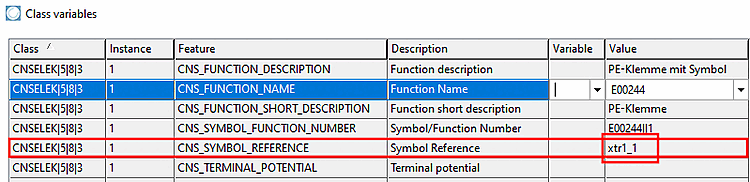
Under these conditions, the calling function that you want to specify more precisely graphically with a user-defined symbol only needs to contain the name of the symbol in the Symbol Reference feature.
A symbol can be referenced by different function instances at the same time. Symbol and function must be "consistent", i.e. the number of pins must match.

The schema presented here can only be applied at compatible functions and symbols. Especially the number of pins has to match.
The case of individual symbols described above is generalized by macro symbols. As already described in chapter Section 5.12.11.15, “Symbol representations (Circuit symbols) "Advanced" ”, macros already contain the mapping of symbol connections to certain connections within the function structure of compatible parts. In particular, a macro symbol cannot be assigned to a specific function. As a result, macro symbols do not need to be referenced via the Symbol Reference attribute and it is sufficient to insert the macro project using the crosslink mechanism.