

- 1.4.3.6.6.5.1. V12 functionality - Preconditions
- 1.4.3.6.6.5.2. Manage index" dialog --- General call and procedure
- 1.4.3.6.6.5.3. Manage index" dialog --- Columns
- 1.4.3.6.6.5.4. Manage index" dialog --- Generation example
- 1.4.3.6.6.5.5. Manage index" dialog --- /
- 1.4.3.6.6.5.6. Manage index" dialog --- Tabbed pages
The
IndexManager from V12 uses a
new JavaLucene Index, which is among $CADENAS_SETUP/partsol.cfg in
following key is activated.
[INDEX:LUCENE]
JavaLucene=1
Even if a complete index from V11 is available, the full text index [Full-text index] for V12 must be completely regenerated. The LinkDB index must also be recreated as it also uses the new index type. The geoindex [Geo index] is immediately displayed correctly; however, it should also be regenerated as there are new algorithms that extend the search options.

The illustration shows the situation with the new index after a recent update from V11 to V12. The index has only been recreated for the "ANSI" catalog.


Select the category Index management [Index administration] in PARTadmin.
Select the catalog you want to index or the catalog you want to examine.
In the context menu of the catalog, click the Manage index command.... [Manage index...]
-> The IndexManager settings [IndexManager preferences] dialog box opens.
Determine which statistics are to be loaded. Activate the desired checkboxes accordingly. (Loading takes some time.)
Geo (old index). The option is deactivated by default, as it is not relevant in the default configuration.
GeoDB (activated by default - from V12.7 this index is used unless it is explicitly deactivated. If an old index exists, it is automatically converted to the new one in the background as soon as the app server is running).
Always show this dialog: If you had deactivated the option but would like to display the dialog again later, activate the option Show the settings dialog on next startup on the Settings tab page (see Section 1.4.3.6.6.5.6.7, “ Settings ”).
-> The Manage index dialog box opens, with the Statistics [Statistic] tab page open by default.

![IndexManager settings [IndexManager preferences]](https://webapi.partcommunity.com/service/help/latest/pages/cn/installation_ecatalogsolutions/doc/resources/img/img_6b7400c573d6434c9ab89021ff6ad89c.png)
The Path / Project column shows the structure of the selected catalog. The other columns show the percentage of generation for the corresponding elements.
Geo: Special algorithms for the geometric search (3D) [Geometric search (3D)]
Topo: Special algorithms for the topology search [Topology search]
GeoDB(Partial): The GeoDB( Partial) [GeoDB(Partial)] column is only displayed if a catalog has been marked for partial search via configuration file. See Section 1.7.4.7.4, “ Block [settings] Key PartialSearchCatalogs - Partial Search ”.
Full text [Full-text] / LinkDB: Depending on whether or is selected at the top left, the corresponding column title is displayed.
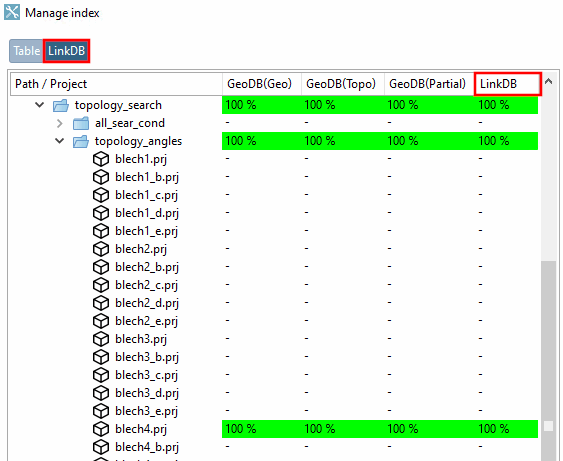
As soon as the Hide fully indexed paths checkbox is activated, the green rows, i.e. those rows that are set to 100% in all columns, i.e. Geo, Topo, GeoDB (Geo), GeoDB (Topo) and Full-text, are hidden.
![Call: PARTadmin > Category "Index management [Index administration]" > Context menu command "Manage index... [Manage index...]" via catalog directory](https://webapi.partcommunity.com/service/help/latest/pages/cn/installation_ecatalogsolutions/doc/resources/img/img_23582ce28c8148a39e5e5a855573c0e1.png)
Call: PARTadmin > Category "Index management [Index administration]" > Context menu command "Manage index... [Manage index...]" via catalog directory
Manage [Manage index...] index generation using Index [Manage index...]... or Generate index for full-text search [Create full-text search index] | Create LinkDB search indexes [Create LinkDB search index] | Geosearch indexes [Geometrical search index] basically do exactly the same thing.

Using Generate index for full-text search [Create full-text search index] | Create LinkDB search indexes [Create LinkDB search index] | Geosearch indexes [Geometrical search index], only entire catalogs can be selected and indexed.
Individual folders, projects and even lines can also be indexed via the Manage index dialog.
The generation of the geo index is shown below as an example. In addition, the GeoDB(Partial) index is generated, for which a special config setting must be set (see Section 1.4.3.6.6.15, “ Update full text search index (and geo search index ) for finding topological values via full text search ”).
The initial situation shows the directory and projects in red. The percentage value shows 0% in all columns (GeoDB(Geo) [GeoDB(Geo)], GeoDB(Topo) and GeoDB(Partial) ). This means that there is no GeoDB index.
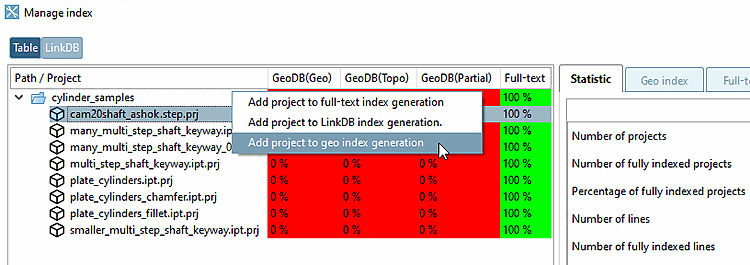
For example, click the context menu command Add project to geoindex generation [Add project to geo index generation] at project level.
-> Tabbed page Index generation is opened.
-> The Generate geoindex [Generate geo index] checkbox is already ticked and the corresponding dialog area is opened.
-> The desired path is already entered under Project selection [Select project]. You can use and to make changes, i.e. add or remove additional projects and directories.
Adding is also possible by drag&drop.
If necessary, adjust the value under Percentage share [Percental fraction], usually to 100% for own parts catalogs (which is the case here in the example).
-> The progress is displayed under Index generation status [Status of index generation].
-> Once generation is complete, the page is automatically refreshed and the GeoDB indexes are displayed at 100%.
-> On the Geoindex [Geo index] Tabbed page, you will see that 3 of 3 indexes (i.e. GeoDB(Geo), GeoDB(Topo) and GeoDB(Partial) =100%) are available.
The procedure for Add project for full text index generation [Add project to full-text index generation] and Add project for LinkDB index generation [Add project to LinkDB index generation.] is identical.


Click on one of the two buttons to switch between table mode and LinkDB mode:
The LinkDB index Tabbed page shows the project table. Here you can see which rows are indexed and which are not by the corresponding icon at the start of the row.


![Tabbed page "LinkDB index [LinkDB index]": In this example, the project "iso_21269.prj" has 3 ERP numbers. The display of 33% means that only one of the three is indexed.](https://webapi.partcommunity.com/service/help/latest/pages/cn/installation_ecatalogsolutions/doc/resources/img/img_30b352b491a54cefaa3b6030892acff9.png)
Tabbed page "LinkDB index [LinkDB index]": In this example, the project "iso_21269.prj" has 3 ERP numbers. The display of 33% means that only one of the three is indexed.
![[Note]](https://webapi.partcommunity.com/service/help/latest/pages/cn/installation_ecatalogsolutions/doc/images/note.png) | Note |
|---|---|
Depending on whether the or mode is selected, the results refer to all table rows or only to those occurring in the LinkDB. | |
The information on the Statistics [Statistic] tab page always refers to the selected element in the index tree.
So select the desired level (catalog, directory or project).
-> You receive a complete overview of the geoindex [Geo index] as well as the full text index [Full-text index] and LinkDB index, with detailed information on indexed projects, lines and fingerprints.
![Statistics [Statistic] " tab page](https://webapi.partcommunity.com/service/help/latest/pages/cn/installation_ecatalogsolutions/doc/resources/img/img_bdfe91a97a4647f5b3c6cb53c344e33c.png)
After finished index generation the statistic is reloaded in the IndexManager.
-> You receive an overview of which indexes are stored for each project line.
Depending on whether or mode is selected, the corresponding rows are displayed on the Geoindex [Geo index] Tabbed page.
The following two illustrations show a typical example of a manufacturer catalog. By default, 1% of the project lines or 3 project lines are indexed.
![If "Table [Table]" is selected, all project lines are displayed.](https://webapi.partcommunity.com/service/help/latest/pages/cn/installation_ecatalogsolutions/doc/resources/img/img_d9c84db81666421c97a061cb85c2df69.png)
![If "LinkDB [LinkDB]" is selected, 3 project lines are displayed, as only these three have an entry in the LInkDB.](https://webapi.partcommunity.com/service/help/latest/pages/cn/installation_ecatalogsolutions/doc/resources/img/img_bae96ab0b6ca424a966f4d9dd0c84bd0.png)

|
All indexes (algorithms) are available for the relevant row (characteristic). It is therefore considered complete. When a project is considered complete depends on the values you selected in the IndexManager preferences dialog. |

|
Element incomplete: Not all indexes (algorithms) are used for the relevant line (characteristic). |

|
Element missing: No indexes (algorithms) are available for the relevant line (characteristic). |

|
Element obsolete [Element deprecated]: Outdated algorithms are used for the relevant line (characteristic). |
| Note |
|---|---|
Depending on whether or mode is selected, the Full text index [Full-text index] or LinkDB index [LinkDB Index] tab page is displayed. | |
Register page full text index [Full-text index]
A table similar to PARTdataManager is displayed (without LinkDB columns and information).
For lines marked with an icon
 there is a full text index [Full-text index].
LinkDB index [LinkDB Index] tab page
In the table on the LinkDB index tab page, you can see which rows are indexed and which are not by the corresponding icon at the start of the row.
Tabbed page "LinkDB index [LinkDB index]": In this example, the project "iso_21269.prj" has 3 ERP numbers. The display of 33% means that only one of the three is indexed.
![Full text index [Full-text index] " tab page](https://webapi.partcommunity.com/service/help/latest/pages/cn/installation_ecatalogsolutions/doc/resources/img/img_3c66c0eb5faf44858ff0c77a03580508.png)

Results declaration [Explanation of result] tab page: For internal analyses only
For a certain search term, search results (and their sequence) can be displayed. The "Score" for a search result can be seen and how it is composed.
When double-clicking on a search result, the element is selected in the index tree.
Here, search variables related to a project are displayed, including unit and type of the variable and all existing description texts.
Tabbed page Index generation: Here you can start index generation in parallel for different index types. You can select the entire catalog, directories, projects or just individual lines.
Elements can be added to the index generation via context menu command or drag&drop.
See example above.
Once index generation is complete, the statistics are reloaded in the Index Manager.
