4.5.1.1. General

Find components with the help of category filters.

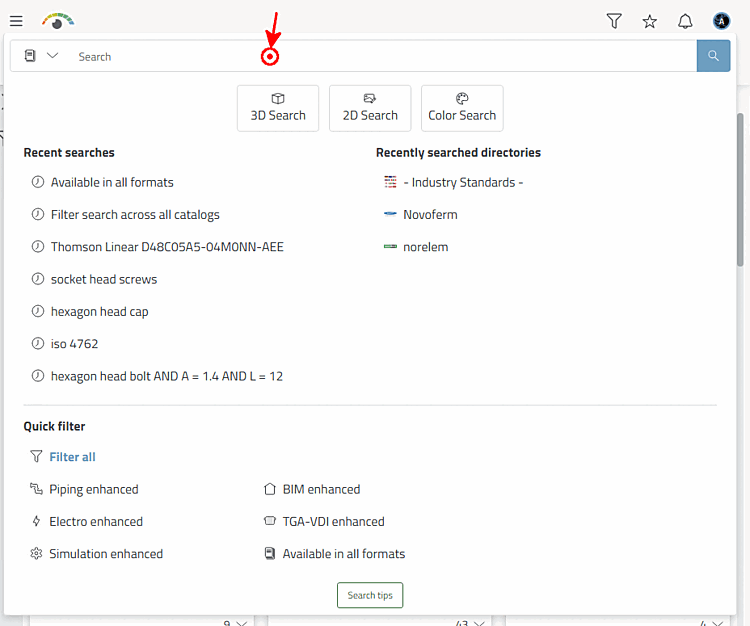
When clicking on Filter the respective dialog is opened with the categories Quick filter, Markets and Recently searched directories.

The figure exemplarily shows the results for "Filter search across all catalogs".When using the option "Filter search across all catalogs" the results during the first loading are completely unspecific, however, depend on the setting under $CADENAS_SETUP/partsol.cfg > FULLTEXTSEARCH > SimilarityFactor. By default, the Standards catalog is prioritized.

The figure exemplarily shows the results for "Filter search across all catalogs".[140]

  • Quick filter

    • Filter search across all catalogs

    • Available in all formats

    • BIM enhanced

    • Electro enhanced

    • Piping enhanced

    • Simulation enhanced

    • TGA-VDI enhanced

  • Markets

    • Architecture, Engineering and Construction

    • BIM architecture

    • Electrical design (Cabinets/Mechatronics)

    • Electronics (PCB)

    • BIM factory planning

    • BIM interior design & furniture

    • BIM infrastructure

    • Mechanical design

    • BIM MEP

    • Marine

    • Plant design

    • Machining tools

  • Recently searched directories

Once a selection has been performed, on the left, the dialog area Filter is displayed.

When selecting Filter search across all catalogs, the initial search results are completely unspecific; for all other selections, catalogs complying with the selected category are already preselected and the displayed search results are already filtered according to preselection.

When activating a filter, it is immediately executed.

Following filters are available in the Filter area:

  • Catalogs:

  • Keywords:

  • Enrichments:

    Icon

    Meaning

    Piping enhanced

    BIM enhanced

    TGA-VDI enhanced

    Electro enhanced

    Simulation enhanced

  • Units: mm, cm, Inch, Feet, etc.

  • File types:

    • 3D native (All formats)

    • 3D imported (All formats)

    • Documents

    • 3D crawled (Vendor link): Catalog automatically created with backlink to manufacturer.

    • Individual formats...

  • Classifications: Terms from classifications

  • Standards: DIN, EN, ISO, etc.

  • Certificates:

    • Certificate RoHS (Restriction of hazardous substances in electrical and electronic equipments)

    • Certificate REACH (Registration, evaluation, authorisation and restriction of chemicals)

    • Certificate EMAS (Environmental management and audit systems)

    • Certificate ISO 14001 (Environmental management)

    • Certificate WEEE (Waste of Electrical and Electronic Equipment)

  • ERP variables (Display depends on administrative settings)

    • ERP state: Normally parts with ERP state "green" = exportable

    • Material: Values from the ERP column "Material"

    • Others such as Surface, State, Custom tariff number, Storage, Price, etc.


[140] When using the option "Filter search across all catalogs" the results during the first loading are completely unspecific, however, depend on the setting under $CADENAS_SETUP/partsol.cfg > FULLTEXTSEARCH > SimilarityFactor. By default, the Standards catalog is prioritized.