![[Note]](https://webapi.partcommunity.com/service/help/latest/pages/cn/partsolutions_user/doc/images/note.png) | Note |
|---|---|
Information for new customers: A video explaining the entire process of registering with PARTupdate, downloading the software and classifications, applying for and importing the license and finally activating QA, downloading your catalog can be found at the following link: https://elearning.easygenerator.com/2fe645e5-1ee4-4ca3-92cb-ead6ee7e7b06/ | |
In order to get access to SVN-managed catalogs, QA has to be activated:
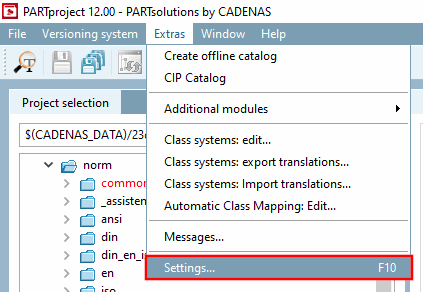
In the Extras menu, click on Settings.... [Settings...]
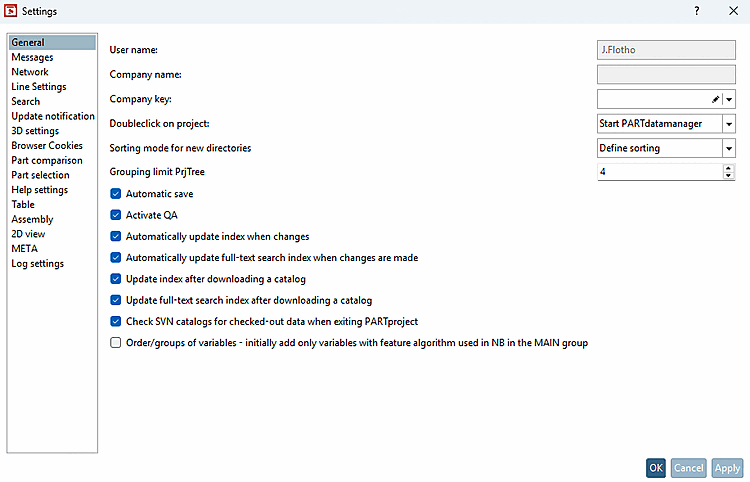
-> The same-named dialog box opens.
Activate the following options:
Update [Update index after downloading catalog] index after downloading a catalog (recommended)
If you want to use all functions in PARTdataManager are to be used for testing, activate the option.[64]
Check SVN catalogs for checked out data when closing PARTproject [Check SVN catalogs for checked-out data when exiting PARTproject] (recommended)
There are some other setting options available:
In order to avoid duplicates at variants or filtered link projects you can enable the automatic update which will be performed if there are geometrical changes.
Update full-text search index after downloading a catalog: Has the advantage that you can use the search within PARTproject straight away.
Check SVN catalogs for checked-out data when closing PARTproject [Check SVN catalogs for checked-out data when exiting PARTproject]: Possibly useful if others are also working on the data in parallel.