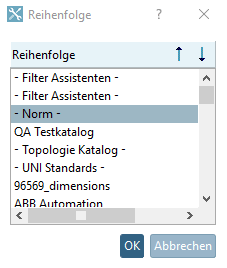
Select the main directory Catalogs and click on the context menu command Sort catalogs.
-> The Sequence dialog box opens. You will see a list of all installed catalogs.
Select that catalog whose position you want to move up or down.
Via arrow keys, change the position up or down.
Alternatively you can also change the position via drag & drop.
-> The new sequence is taken into the index tree.
![[Note]](https://webapi.partcommunity.com/service/help/latest/pages/cn/partsolutions_user/doc/images/note.png)
Note The change is also available for other applications such as PARTdataManager and PARTproject as soon as they are restarted. No index update is required for this action.
In PARTproject there is also the possibility to change the sorting of the catalogs. In addition, subdirectories can also be sorted there, which is not possible in PARTadmin. However, when making changes via PARTproject the index in PARTadmin must be updated at the corresponding directory level (which may take hours at catalog level depending on the number of installed catalogs) in order for the change to take effect for other applications. See Section 5.8.2.1.14, “ Sort directory ” in eCATALOG 3Dfindit directory.