1.3.8.6.13.  Uninstall catalog

This command removes the selected directory from the index tree. Uninstall catalog is only available for top level directories (catalogs) and additionally added directories (own parts).

Mark the catalog.

By right-clicking, open the Uninstall catalog menu.

--> The catalog is uninstalled and no longer displayed in PARTsolutions.

[Note]Note

If you delete the top level folder all subdirectories will be removed. In addition a new index must be created (see ???).

[Note]Note

Index management is usually only available for the administrator. In order to, for example, uninstall catalogs, you must set the entries below. The current mode is displayed in the status bar at the bottom right (Admin Del).

The corresponding entry in the configuration file can be edited under PARTadmin -> Category -> Configuration files -> $CADENAS_USER --> partsolu.cfg -> COMMON.

Set:

IsAdmin=YES
CanDel=YES

[Note]Note

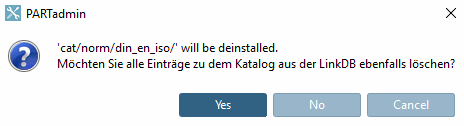
Deinstallation when ERP integration is used:

You get a message, whether you also like to delete the linked entries in the LinkDB.

The entries from all relevant tables are deleted.

LINKTABLE, ERPTABLE, PLMTABLE2, PRJTABLE, CLASSASSIGNTABLE, TREETABLE