

For all CAD systems there is the AttributeMapping (3D/2D/native) Tabbed page under PARTadmin -> Category -> PARTsolutions -> CAD Integration [CAD integration] -> CAD System. In the configuration file, the corresponding block is called "AttributeMapping".
![[Note]](https://webapi.partcommunity.com/service/help/latest/pages/cn/partsolutions_user/doc/images/note.png) | Note |
|---|---|
On this tabbed page normally you don't have to make extensive changes, unless you want to create another tabbed page. Especially because of this the logic of structure is described. Otherwise, you control the language of the 3Dfindit standard attributes via the value of the "Attr_CopyFrom_01" key (see the next section under Attr_CopyFrom ). | |
![[Tip]](https://webapi.partcommunity.com/service/help/latest/pages/cn/partsolutions_user/doc/images/tip.png)
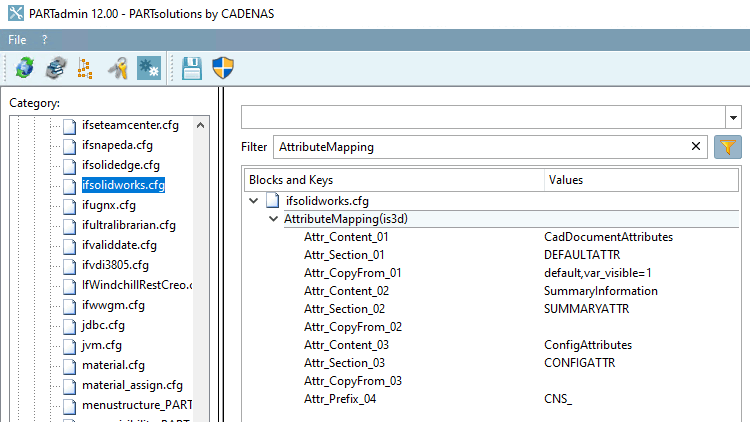
PARTadmin > Category Configuration files > $CADENAS_SETUP > if<cadname>.cfg: Fig. exemplary for SolidWorks
Here you can adjust the following:
Transfer of the 3Dfindit standard attributes:
Should the 3Dfindit standard attributes be transferred to the CAD system?
If yes, in which language(s). (About language variants see under Section 3.2.8.5.4, “Export standard attributes in several languages ”.)
Note If all 3Dfindit standard attributes are to be transferred in the default language, you do not need to make any adjustments.
If needed, certain attributes can be excluded.[a]
Standard value in the key "Attr_CopyFrom_01":
default
You can exclude attributes by using the parameters var_exclude and var_visbile=1:
Example 1: Variable A is explicitly set to the exclude list.
default,var_exclude=A,var_visbile=1
Example 2: The variable A is explicitly set to the include list.
default,var_include=A,var_visbile=0
On the level of configuration file there are further options: The expression can only be applied to certain catalogs.
Attr_CopyFrom_01(isCatalog(norm))=default,var_exclude=D,var_visbile=1
[a] For example, if errors arise in the CAD when transferring system attributes (e.g. "Material").
Per default some blocks are defined, which are used to set custom attributes and in addition for some cad systems special attributes which are displayed in special dialogs in the CAD system.