

You can get an overview of project changes before updating the catalog.
Simple review of project changes
View the information on the Release Notes and Change Details [Modification Details] Tabbed pages.
Please also note the information icons:
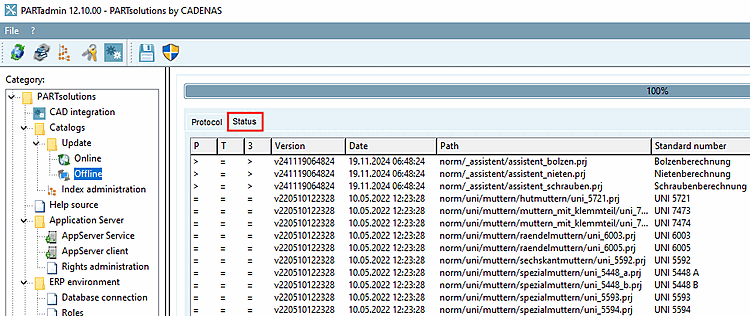
If you have the catalog cip file available, you can work with the offline version under PARTadmin -> Category Catalog update -> Offline and also display a tabular list of all projects BEFORE the installation.
![[Note]](https://webapi.partcommunity.com/service/help/latest/pages/cn/partwarehouse/doc/images/note.png)
Note If you want to use this function, please make sure that the Install after download option is deactivated!
Detailed information on this can be found under Section 1.4.3.4, “ "Check" and "Compare " before installing the catalog ” in ENTERPRISE 3Dfindit (Professional) - Administration.
The list shows for each project whether a change has been made and if so, where exactly, whether in the project, table or 3D.
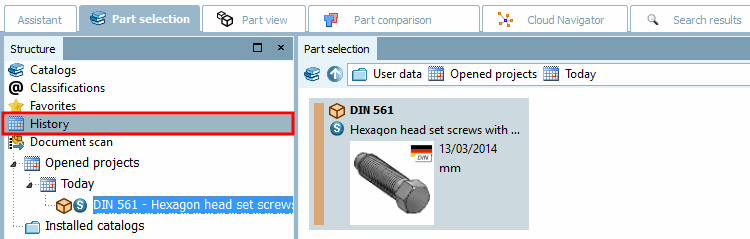
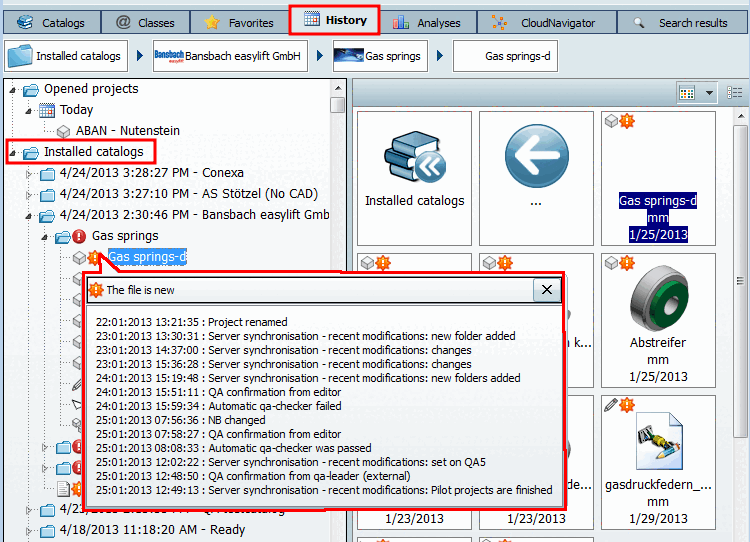
AFTER the installation you will find the same information in the PARTdataManager under Part selection -> History -> Installed catalogs.
Here you can see which catalogs have been added and when, and which files have changed compared to the previously installed version.
The following icons indicate the respective directory or project status:

Change / New in the directory [Changes / New files in the directory] 
At directory level: All projects in the directory are unchanged.


The file is new / New project 
Project deleted The following figure shows an example.
If you move the mouse over the icon, the tooltip with the change history of the catalog becomes visible.
Before an update, you can also compare the table [Table] and the corresponding 3D view of the current and the catalog version to be installed for any construction parts.
You can compare the table [Table] and 3D view in the "Catalog comparison [Catalog comparison]" dialog box.
Note If you would like to use this function, please note that the Install after download option is deactivated!
Detailed information on this can be found under Section 1.4.3.4, “ "Check" and "Compare " before installing the catalog ” in ENTERPRISE 3Dfindit (Professional) - Administration.
![Tabbed page "Release notes [Release Notes]"](https://webapi.partcommunity.com/service/help/latest/pages/cn/partwarehouse/doc/resources/img/img_80ffc8c9b17f4596a814ac8e24c67ab0.png)


![Tabbed page "Change details [Modification Details]": Changed projects are listed.](https://webapi.partcommunity.com/service/help/latest/pages/cn/partwarehouse/doc/resources/img/img_3d2d8643ff404609bfa72c027fedea99.png)
![Deactivate "Install after download [Install after download]"](https://webapi.partcommunity.com/service/help/latest/pages/cn/partwarehouse/doc/resources/img/img_8fd78a786e864091bf1831d6f5aa4295.png)
![You can compare the table [Table] and 3D view in the "Catalog comparison [Catalog comparison]" dialog box.Catalog comparison](https://webapi.partcommunity.com/service/help/latest/pages/cn/partwarehouse/doc/resources/img/img_91fa2847a4a24dda997f8d31ff3105a6.png)
[7] The display of the history can be switched on and off via the configuration file. See Section 1.7.3.7.2.9, “ Key "ShowInstallHistory" - Switch change history of installation history on/off ” in ENTERPRISE 3Dfindit (Professional) - Administration.